Chat with Mavka on GitHub
Mavka supports interactive code discussions on GitHub with chat functionality using single comments or review comments.
What is Mavka’s Chat Feature?
Mavka allows users to engage in interactive conversations directly within GitHub’s pull requests. This feature enables you to ask Mavka specific questions about code, request clarifications, and follow up on Mavka’s review comments in a conversational manner.
With Mavka’s chat functionality, you can:
- Start a new conversation with Mavka by leaving a single comment.
- Start the conversation by replying to Mavka’s review comment.
Rule
For Mavka to recognize and respond to your questions, you must
mention her in the comment by using @mavkaapp.
How to Use Mavka’s Chat Feature on GitHub
Step 1: Start a Conversation
There are two ways to initiate a conversation with Mavka:
- Single Comment:
- Navigate to the pull request file (in Files changed) where you want to discuss a specific code segment.
- Create a single comment on the code where you want to discuss a specific code segment and mention
@mavkaappto direct the question to Mavka.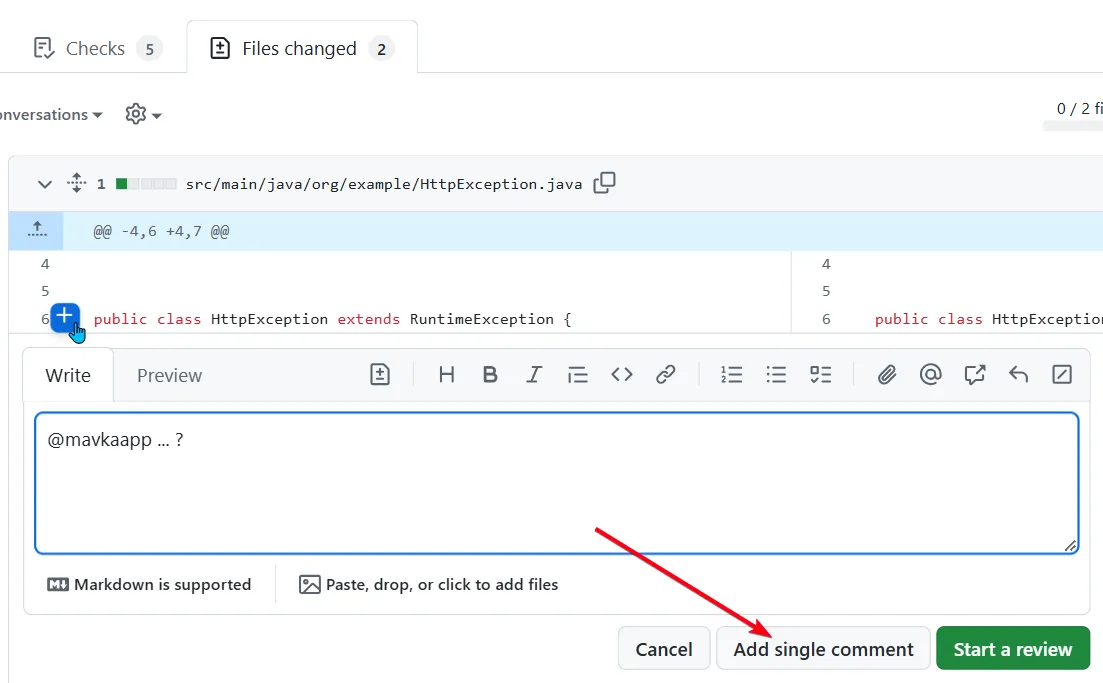
Example:
@mavkaapp Could you explain why this function uses recursion here?- Reply to Mavka’s Review Comment:
- If Mavka has already provided a review comment, you can reply to her comment to continue the conversation.
- Make sure to mention @mavkaapp in your reply to keep the conversation active.
Example:
@mavkaapp Thanks! Could you clarify how this impacts performance?Mavka will review your question and respond with her insights.
Hint Mavka’s chat feature maintains context within a single comment thread, so you can ask multiple questions without losing the flow of information.
Step 2: Mavka’s Response and Reaction
Once Mavka has replied to your comment, she will mark the comment with an “eyes” emoji reaction (👀) to indicate that she has acknowledged and responded to it. Please avoid adding the eyes emoji yourself before Mavka responds, as this can cause context loss or missed responses. Similarly, avoid removing the emoji after Mavka has added it, as this may disrupt the conversation flow and cause context loss.
How Long Mavka Remembers Context
Mavka keeps the conversation context within a single comment thread for up to one week from the time the comment was written. So it means that after one week, Mavka’s memory of the comment will expire. You can return to the same thread within that week to ask follow-up questions, and Mavka will retain the context of your previous exchanges.
Benefits of Mavka’s Chat Feature
- Interactive Assistance: Mavka’s chat feature allows you to receive clarification and guidance directly in GitHub, making it easier to understand complex code changes.
- Contextual Conversations: By keeping all related questions and responses within a single thread, Mavka helps maintain an organized and focused discussion.
- Flexible Inquiries: Whether you’re starting a new question or following up on Mavka’s initial review, you have the freedom to ask multiple questions without the need to start a new comment for each inquiry.
With Mavka’s chat functionality, code reviews and discussions become more efficient and interactive, helping you gain a deeper understanding of your codebase.